Category Sticky Post For WordPress

August 27, 2012 — 46 Comments

Category Sticky Post

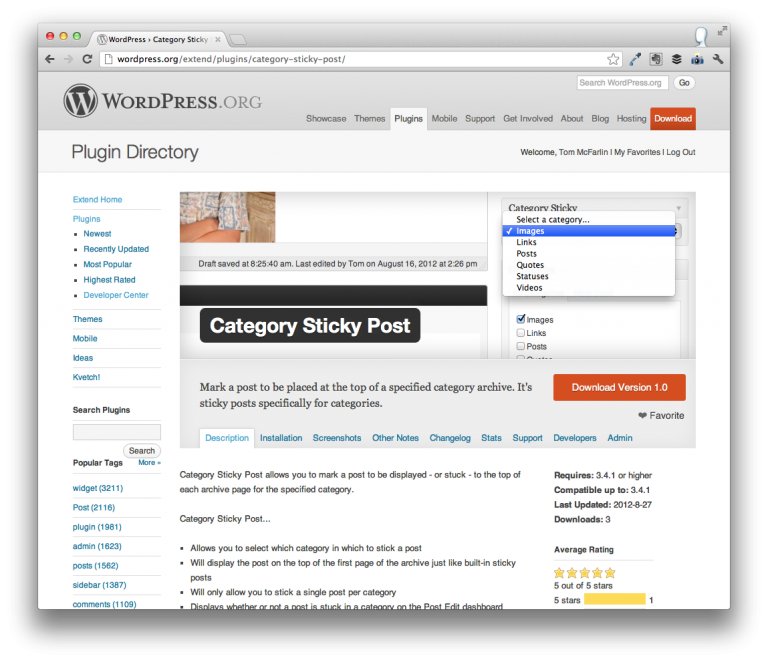
Category Sticky Post for WordPress is a plugin that allows you to mark a post as sticky within a specific category archive. It works exactly like the typical sticky post functionality within WordPress, except that it’s specifically for category archives.

This means that if you have a set of articles under one category, you can mark one to always appear at the top of the category archive.

I’ve written and released a similar plugin – Tag Sticky Post – which came out of a need for my own site. But we all use categories and tags differently. As such, I wanted to make sure that I covered both types of archives.

The problem that the plugin attempts to solve is the same as that of Tag Sticky Post. Directly from that project’s post:

The problem is that I often write a post introducing the project, what it does, why I wrote it, and where you can find more information about it. But over time, I write posts that cover various updates or other issues about the project ultimately pushing the introductory post – arguably the most important post – lower into the archive.

Category Sticky Post has the following set of features:

  • Allows you to select which category in which to stick a post
  • Will display the post on the top of the first page of the archive just like built-in sticky posts
  • Will only allow you to stick a single post per category
  • Displays whether or not a post is stuck in a category on the Post Edit dashboard
  • Provides light styling that should look good in most themes
  • Is available on each post editor page
  • Is fully localized and ready for translation

Be sure to check out a variety of screenshots, too.

You can install it from the WordPress Dashboard or download it from the plugin’s homepage.

46 responses to Category Sticky Post For WordPress

  1. This plugin is exactly what I was looking for, but it doesn’t seem to be working for me…. I have defined what category the post should be in, and assigned the sticky post to that same category, but all of my sticky posts are showing at the top of all the categories. Is there a certain way I need to be calling for the Sticky Post in the category.php file that perhaps I am missing? Thanks!

  2. This works great, and is exactly what I need.

    Yet, the post seems to be too wide for my site? Is there a way to adjust the width?

    http://churchletters.org/category/free-sample-church-letters

    It’s the post at the top that says “Free Letters” – As you can see the border of the post doesn’t line up with the others…

    Thanks,
    Norm

  3. Great plugin, it was exactly what I was looking for! Thank you!

  4. Hi
    Thank you for this plugin.
    I have a question : All the categories are not displayed in the list. is there any maximum number ?
    Thank you !

  5. The category sticky is working for me with one problem. It is sticking the post to the top of my home page as well as the category I specified. I checked and the box is not checked for regular sticky posts. Help.

  6. Hi Tom, We’re doing ‘Category Podcasting’ with WordPress, and I’m just wondering if I use this to make a post sticky, what will it do to the RSS feed, will it always make the top item in the feed the sticky one? However I don’t want this, I want the top sticky simply for information about what the podcast is about for this particular podcast series.

  7. Love the plugin, but i’m having the same problem with overlap. I removed the margins from plugin.css, but it is still there. Any ideas?

  8. Is there a way to increase the number of post that can be “sticky post”?? Instead of just one can I increase it to 5? 10?

    If so you would be my super hero man.

    • Unfortunately, not – the plugin only allows for one post per category to be placed at the top.

      Too bad, man. It’d be fun to be a super hero. Batman’s pretty cool, no? :)

  9. Hi, this plugin works almost perfectly. If I change the product and store the specified sticky category is deleted. So I need to save again after the item category and specify save the sticky.

    Is that intentional?

    Thank you
    Jochen

  10. Hi Tom

    This plugin was exactly what I need, so I installed it and it worked as described. The only trouble is that my menu items in the menu admin page became “frozen” ie they can’t be pulled up and down and no dropdown menu items can be added. This happened on three themes I tried, Slide, twenty-twelve and Suffusion. Is there a workaround please, as I would like the functionality of your plugin.

    Thanks
    Vic

    • Hey Vic,

      This sounds like it may have to do with another plugin as Category Sticky POst was tested with Twenty Eleven, Twenty Twelve, and Standard during development. There’s also only CSS changes that have been made – no JavaScript that would interfere with a menu.

      This is also the first report I’ve had of this. If disabling all the plugins doesn’t fix the problem, please send me an email.

  11. I’ve noticed that it won’t apply the custom ‘category-sticky’ class to the post if the post is assigned multiple categories. For example, I have it set to CategoryA and Featured (which displays the post on the homepage), and have it stickied in CategoryA. The stickiness works fine, but it doesn’t apply the ‘category-sticky’ class, so I can’t do any custom styling. If I remove the Featured category, it works, but then won’t display on my homepage. Any ideas?

  12. is there a way to have more lines of the sticky post content show on the category page before the “read more” link appears? but not have the other posts affected?

    • If I’m understanding your question correctly, there is not. It simply provides additional styling to the existing post and doesn’t interfere with the more tag.

  13. Great plugin, it does almost EXACTLY what I need.

    Is is possible to stick more than one post to the top of the category archive?

Trackbacks and Pingbacks:

  1. Building Category Sticky Post and Tag Sticky Post - Tom McFarlin - August 28, 2012

    [...] I released two plugins for WordPress – Category Sticky Post and Tag Sticky Post – both of which serve the same purpose: Allows authors to mark a post to [...]

  2. Category Sticky Post and Tag Sticky Post Updates - Tom McFarlin - December 18, 2012

    [...] week, I updated both Category Sticky Post and Tag Sticky [...]

  3. aussichten. Perspektivierung von Geschichte » Blog Archive » Web 2.0: Wordpress-Posts in Kategorienansicht an erster Stelle plazieren - March 20, 2013

    [...] http://tommcfarlin.com/category-sticky-post [...]

Leave a Reply

*

Text formatting is available via select HTML.

<a href="" title=""> <abbr title=""> <acronym title=""> <b> <blockquote cite=""> <cite> <code> <del datetime=""> <em> <i> <q cite=""> <strike> <strong>