As nice as event-driven programming can be within the context of WordPress’ hook system, one of the challenges is preventing code from executing every single time the hook is called.
For example, say you’re writing a function that fires during the init action but something happens in WordPress core that triggers the init action to fire again consequently causing your code to fire once again even though it’s unneeded.
Multiply this across however many callbacks spread across however many files and general functionality registered with the hook and you may end up affecting performance and/or executing code that has no need to be run.
Static Variables in Plugin Bootstrap Files
How an LLM thinks this post would look as an image.
One way this can happen is in a plugin’s bootstrap. Case in point: Say your plugin is registered with the init action and then it sets up a registry which in turn instantiates a set of subscribers that register services. Repeating this every single time init is fired is unnecessary.
Here’s a way to manage this:
add_action( 'init', 'tm_acme_function', 100);
function tm_acme_function() {
  static $initialized = false;
  if ( $initialized ) {
    return;
  }

  $initialized = true;

  // ... set up the rest of the function.
}
If you know how static variables work, you’re may already be doing this, you’re able to follow the above code, or both. And if that’s the case, there’s nothing else to see here.
But if not, static variables can be useful in this scenario because static variables maintain state between calls whereas regular variables are reinitialized every time the function fires. This means a static variable retains its value across multiple calls to the function.
Static Variables and Plugins
So having an static $initialized flag works like this:
$initialized starts as false.
When the function runs for the first time, the $initialized variable is set to true.
On subsequent calls, the condition if ( $initialized ) prevents the rest of the function from executing, effectively short-circuiting it.
And because of that, this:
prevents redundant execution,
optimizes performance by avoiding running unnecessary code (especially as it relates to registering duplicate functionality, running multiple queries, or trashing data unintentionally).
If your plugin’s bootstrap registers a callback with a WordPress hook, considering using static variables to prevent code from being called unnecessarily more than once.
TL;DR: If you’re using WordPress 6.1+ and aren’t able to schedule any type of job with Action Scheduler, this article explains the problem and a potential fix.
Specifically, this seeks to address the following message appearing in WordPress 6.1+:
Cron reschedule event error for hook: action_scheduler_run_queue, Error code: invalid_schedule, Error message: Event schedule does not exist., Data: {"schedule":"every_minute","args":["WP Cron"],"interval":60}
Resolve the Reschedule Event Error
Introducing More Logging
Starting in WordPress 6.1, additional logging was added to WordPress core. Specifically, the patch responsible for this includes the following description:
Rarely and randomly some of my custom cron events have disappeared. From searching around, I’m not the only one with this issue, and no one else was able to figure out why. I also was unable to debug the issue since wp-cron.php doesn’t log any errors nor have any hooks to try handling them. This patch adds those in.
Once this patch was introduced, it also resulted in others experiencing issues with cron and cron-related libraries starting from this ticket and then taking place in a specific forum post.
When you’re trying to create a schedule but it keeps blowing up.
And sure, these tickets are helpful as are the comments and the rest of the discussion in the forum. But there are times when we’re working on a specific task with a specific set of dependencies and need a specific solution.
Action Scheduler and Cron Jobs
My problem was this: I was trying to to register a job using Action Scheduler and the library wasn’t able to register the schedule because of the aforementioned problem.
So the fix was to add this function in my code:
/**
 * Additional logging in WordPress 6.1+ that generates the following
 * message regarding cron schedules:
 *
 * Cron reschedule event error for hook:
 * action_scheduler_run_queue,
 * Error code: invalid_schedule,
 * Error message: Event schedule does not exist.,
 * Data: {"schedule":"every_minute","args":["WP Cron"],"interval":60}
 *
 * This function needs to fire prior to loading Action Scheduler as its a
 * pre-requisite for it to schedule our tasks.
 *
 * This filter seeks to manually add the schedule to the list of schedules to
 * address this bug.
 */
add_filter('cron_schedules', function ($schedules) {
    $schedules['every_minute'] = [
        'interval' => 60,
        'display'  => 'Every Minute',
    ];
    return $schedules;
});
A few things about this code:
I don’t recommend using this as a permanent fix for every case. It’s a specific solution for a generic warning.
If your codebase is going to be distributed to wide audience, avoid anonymous functions. If you have control over the environment in which it will return, it may be fine.
On the other hand, if you’re using Action Scheduler, WordPress 6.1+, and are trying to register your own jobs and are seeing this message, this will ensure schedules Action Scheduler uses are available.
When I first started writing about anonymous functions in WordPress back in January, I didn’t anticipate it spanning over three articles reaching into the fourth month of the year. But here we are.
That said, this final article in the series aims to help provide a short introduction to a number of technical ideas both in PHP and WordPress to explain why deregistering anonymous functions is nearly impossible.
And it provides a way for us to actually get contextual information about every single hook and callback in an instance of WordPress so we can handle the anonymous functions as we see fit all through the use of a plugin.
Recall from the first article, the reason I started writing about anonymous functions in WordPress all stemmed from a tweet (or post or whatever they are currently called) that stated:
I do wish developers would stop using WordPress hooks with (what I think are called) anonymous functions […].
They are very hard if not impossible to unhook.
And the short of it is that it’s true: Anonymous functions are easy to register against WordPress hooks and are difficult to deregister.
I’ve recently switched to Laravel Herd for local development. It uses Valet internally, which I obviously like, and comes with a lot of tools out of the box that make some of the overhead of development much easier.
It’s a hard hard at work.
And any utility that makes it easy to focus on actually writing code while reducing anything that deals with reading logs, configuring different versions of PHP, and even debugging is something I’m in favor of using.
Off the shelf, Herd makes debugging with PHPStorm easy; however, if you’re to get started with Laravel Herd, Xdebug, and Visual Studio Code then there’s a little more configuration to do.
Laravel Herd, Xdebug, and Visual Studio Code
A Word About Herd Documentation
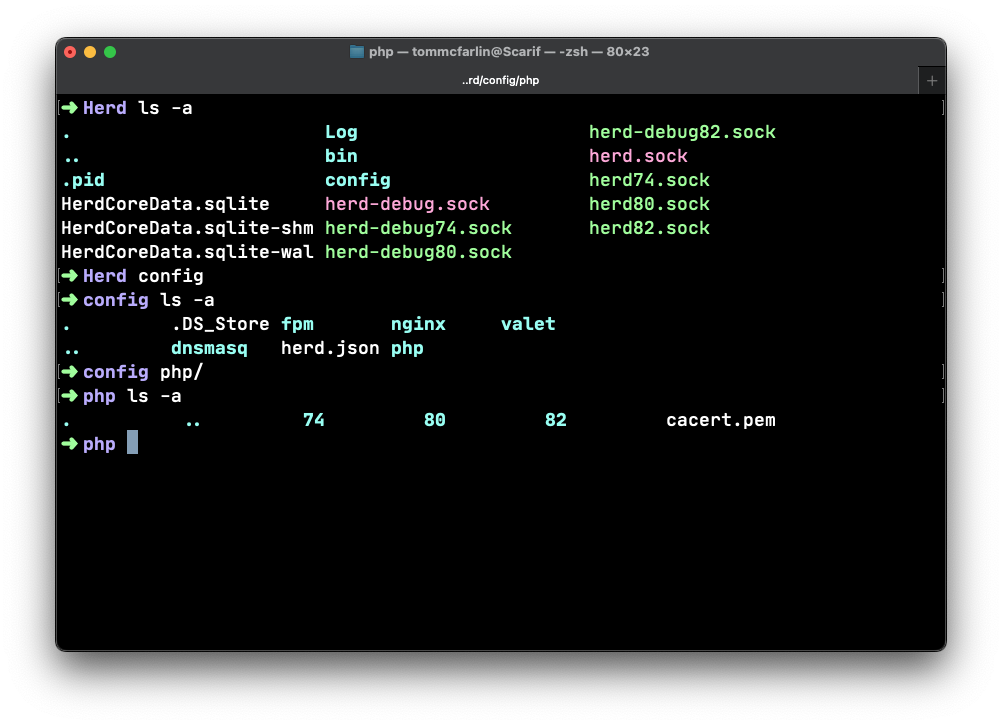
I want to point out I think Herd’s documentation and file structure is one of the best I’ve seen. It’s easy to understand, easy to navigate, and easy to find various configuration files – say php.ini or debug.ini – regardless of the version of PHP you’re using.
A quick example of the directory structure of how Herd organizes its files and configuration.
That said, there’s not much in the way of how to configure Xdebug and Visual Studio code.
Herd, Xdebug, and Code
Here are the steps what worked for me to get my local environment setup. Note this was tested with PHP 7.4, 8.0, and 8.2.
For the following example, note I’m using Apple Silicon and am going to be using PHP 7.4. Very few things should be different save for the paths to the files references in the below code.
HERD
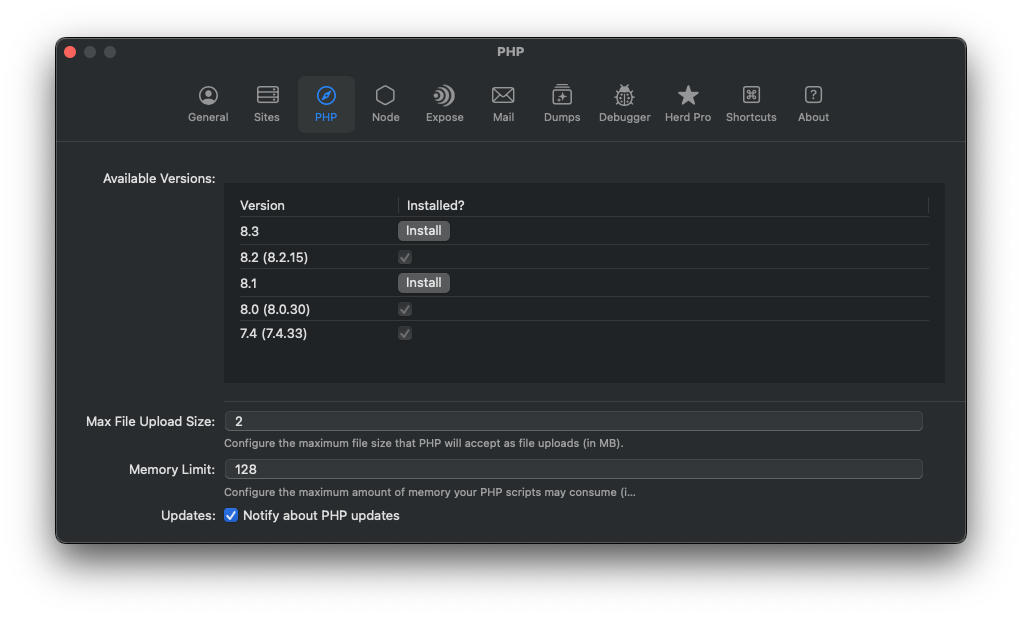
Changing PHP versions is trivial in Herd. This is a matter of selecting the version you want to install and/or marking it as active for your current site.
I mention this though, because it’s important to know which one you’ve got activated so you can properly update the relative Xdebug configuration.
XDEBUG
Unless you’ve set up Herd in some abnormal manner, you should find the extension in the following path:
From here, you want to open the relative php.ini file and add the following. Note that this is different than what the Herd docs show. I don’t know if it’s because they are specific to PHPStorm or not, but this is what worked for me with Visual Studio Code.
First, locate the php.ini file in the following path:
You should not need to touch the debug.ini related to the the PHP version in the same direction.
VISUAL STUDIO CODE
Finally, in Visual Studio Code, create a .vscode directory if it doesn’t already exist in the root of the project. Next, add launch.json to the directory.
You’ll likely need to restart Herd after this so issue the $ herd restart command in your terminal.
Conclusion
Now you should be able to set breakpoints, add watches, step into code, and all of the usual things you can do with the Xdebug but in a Herd environment.
Heads Up! Originally, I wanted to include both how to identify anonymous functions in WordPress and how to unhook them; however, the more I began writing about the topic, the longer the article became.
So I’ve split the content into two articles: This one outlines how to identify anonymous functions registered with hooks. A future article will detail how to de-register said functions.
As I started writing, it became obvious it’s helpful to understand what PHP does behind-the-scenes when anonymous functions are registered.
So during the first article, I spend time explaining both how anonymous functions are registered – which is clear enough – and how anonymous functions are managed internally by PHP.
If you haven’t read the article, I urge you to do so. But if you’re opting out, the short of it is this:
You register an anonymous function with an associated WordPress hook,
PHP generates an ID via hashing for the anonymous function so that it can be managed internally.
It sound easy enough, but problems arise if you want to programmatically identify those anonymous functions. PHP keeps track of them and the functions fire as they are intended but what happens if you, as a developer, want to access those functions to deregister them?
Identify Anonymous Functions
Before looking how, or if, it’s even possible to deregister anonymous functions, it’s important to know how to identify anonymous functions programmatically. That is, if we know we’re working in an environment where anonymous functions have been registered, how do we actually find them?
This programmer is completely at a loss for where to find an anonymous function.
Again, since these functions are registered with WordPress hooks and since these functions have an ID internally generated by PHP, there’s code we can write to help us understand where these functions are registered.
In the following bit, I’ll show exactly how to do this. This won’t necessarily explain what the code is going nor will it explain who registered the code, but it’ll give us some insight as to what anonymous functions are registered with which hooks.
And that’s a good starting place.
Finding Anonymous Functions
Before using any other specific tools, I’m going to use the following:
It’s not pretty, this isn’t the usual set of tools with which I’d recommend using, but it’s a starting point that’s going to demonstrate the point. In other words, this is a quick and dirty approach to get started.
Further, we’ll be writing anonymous functions in the theme’s functions.php to make it easier to have parity with the content of the article.
With all of that in place, I’ll open functions.php and then add the following code:
add_action('wp_head', 'listRegisteredFunctions', PHP_INT_MAX);
/**
 * Lists all the registered functions.
 *
 * @return void
 */
function listRegisteredFunctions() {
     global $wp_filter;

     echo <<<HTML
     <div style="background:white; font-size:14px;">
         <pre>
    HTML;
        print_r($wp_filter);
    echo <<<HTML
         </pre>
     </div>
     HTML;
 }
This uses the global $wp_filter object which holds information on all of the referenced actions and filters with WordPress. Note also that I’m setting this up to fire in the wp_head hook and that I’m using PHP_INT_MAX to make sure it has the highest priority (so it fires as late as possible).
Note: I do not recommend nor even suggest using PHP_INT_MAX in a production environment because it makes it incredibly difficult to add anything after that registered hook. This is just for demonstration purposes.
If you run this and then refresh the homepage of your installation, you’re going to see a lot of information. Some of it will make sense, some of it may not. Regardless, it’s going to be a lot of data. And as interesting as it is, there’s not much we can do with it.
If there’s not much to do about it, might as well laugh about it.
To help simplify what it renders, let’s look at something that’s registered with just one of the hooks. Specifically, let’s look and see what’s registered with the wp_enqueue_scripts hook. This hook is one that most anyone who has worked with theme or plugin development has used and something that’s going to have a number of associated callbacks within the context of a theme.
Note, I’m going to use a similar function as used above. I will, however, be changing the actual code in the function. Additionally, note that I have some guard clauses defined for early return so that if nothing is registered with the hook or if there are no callbacks, the function won’t run.
The code looks like this:
add_action('wp_head', 'listRegisteredFunctions', PHP_INT_MAX);
/**
 * Lists all the registered functions.
 *
 * @return void
 */
function listRegisteredFunctions() {
     global $wp_filter;

    if (!isset($wp_filter['wp_enqueue_scripts'])) {
        return;
    }

    // Get all functions/callbacks hooked to wp_enqueue_scripts
    $callbacks = $wp_filter['wp_enqueue_scripts']->callbacks;
    if (empty($callbacks)) {
        return;
    }

    // ...
}
It’s not going to render anything yet, though, because I don’t have the code for actually rendering the callbacks and functions associated with the hook. To do that, we can iterate through the callbacks and get each function and its associated priority.
The two important things to take away from the above code are:
I’m adding the function and the $function['function'] to an array that’s dumped by print_r.
$function['function'] contains a reference to the callback function.
In the outer foreach loop, note that $functions is the associative array representing the callbacks hooked to the wp_enqueue_scripts. In the inner loop, $function has information about the callback and $function['function'] is the actual callback itself.
In the environment I’m using to test this code, I’m running the twentytwenty theme and I’ve added the above code to functions.php. If you’re following along with the same – even if it’s a different theme – you’ll likely see something like this written out to the screen:
I’ve opted to use this as an example because it’s prefixed with twentytwenty_ meaning it’s likely going to be found within the theme. And when I search for this function in the theme within my IDE, I found the following:
/**
 * Register and Enqueue Scripts.
 *
 * @since Twenty Twenty 1.0
 */
function twentytwenty_register_scripts() {
    // Code remove to keep the code succinct.
}

add_action( 'wp_enqueue_scripts', 'twentytwenty_register_scripts' );
The important thing to note here is that we see the function twentytwenty_register_scripts is, in fact, registered with the wp_enqueue_scripts hook.
The purpose of looking at this is to see that we’re successfully able to find code that’s registered with our hook of choice. The next challenge, though, is finding anonymous functions that are registered with the same hook.
Sometimes, printing out the code and searching for anonymous functions helps. Supposedly.
You can argue that it’d be more helpful to go ahead and find all anonymous functions registered with this hook but let’s first create out own so we can get an idea as to how this looks.
When doing this, you’ll see how complex, though not impossible, managing anonymous functions can be.
Creating Our Own Anonymous Function
First, comment out the code that’s listing all of the functions registered with the wp_enqueue_scripts hook.
This dude thought registering a function with a hook literally meant he needed a hook.
Next, let’s add our own anonymous functions to functions.php. This will render a message at the top of the page and it will allow us to use previously written code to track track this anonymous function.
add_action('wp_enqueue_scripts', function () {
    echo <<<HTML
        <div style="border:1px outset gray; padding: 1em;background:#ccc;position:fixed;top:0;left:0;z-index:99; width: 100%;">
            This is a a sample anonymous function.
    </div>
    HTML;
}, 0, 10);
When you refresh the page you’re on, you should see something like this:
The next step will be to run the previously written code and attempt to locate this function.
Now let’s reintroduce the code responsible for printing all of the functions registered with the hook. Assuming you’ve done everything correct, you’ll notice a new piece of data rendered on the page.
Assuming there are no other anonymous functions in your code, then this is the function we just wrote and the one we’re looking to manage.
When dressed like this in a place like that, you’re ready to manage all of the code.
So this raises the following two questions:
How can we relate an anonymous function to a specific hook?
How can we de-register this function?
Since we know that PHP generates an internal ID for closures and since we have an anonymous function currently hooked to the wp_enqueue_scripts hook, let’s see what we can do.
Relating Anonymous Functions to Specific Hooks
First, let’s update the code in functions.php so that it dumps all of the information for the closure. I’ll show the code first then explain what it’s doing:
add_action('wp_enqueue_scripts', function () {
    $backtrace = debug_backtrace(DEBUG_BACKTRACE_PROVIDE_OBJECT, 2);
    echo '<pre>';
    var_dump($backtrace[1]['object']);
    echo '</pre>';
    // The original code is here...
});
Note this part is going to require a bit of functionality offered by PHP. Some of you who have worked with PHP for years may be familiar with this; some of you may not. And if not, that’s okay! I’ll explain it then share a bit more about it.
In the function, I’m grabbing information from one of the built-in PHP functions called debug_backtrace and then I’m using the DEBUG_BACKTRACE_PROVIDE_OBJECT constant to help.
This is a breakdown of each argument and the function to which they are passed:
debug_backtrace() is a function in PHP that returns a backtrace, which is an array of associative arrays containing function call information. It provides a snapshot of the call stack at the point where it is called, showing the hierarchy of function calls leading up to that point.
DEBUG_BACKTRACE_PROVIDE_OBJECT is a constant flag that can be used as an option when calling debug_backtrace(). When this flag is set, each frame in the backtrace will contain an entry named ‘object’ representing the current object instance.
The 2 is an optional parameter specifying the number of stack frames to return in the backtrace. In this case, it limits the backtrace to two frames.
And, for what it’s worth, a “frame” refers to a specific level or entry in the call stack (which is, essentially, the order in which functions are called).
This is what a call to this function actually does:
The first frame is the frame where debug_backtrace() is called (that is, the anonymous function itself).
The second frame is the frame where the function that called debug_backtrace() resides.
By limiting the frames to two, you get information about the current function (anonymous function in this case) and its caller.
As I mentioned at the start of this section, using functionality like this is something that comes with having worked with PHP for several years. I don’t remember exactly when I learned it myself. Regardless, that’s an advantage of articles like this, I guess (read: I hope) – it exposes you to new things of which you may not have otherwise been aware.
And yes, de-registering hooks in WordPress is challenging but it’s through these type of facilities that we should be able to do so. When you view this code in your browser, you should see something like the following located in the data you’ve printed to your browser:
Recall from the previous article that PHP does two things when registering callbacks:
Generates an ID for the closure. To generate a unique identifier for this closure, WordPress uses the spl_object_hash() function.
Associates the ID with the callback. The generated closure ID is then associated with the callback function, allowing WordPress to track and manage callbacks even when they are anonymous functions.
And since this is an anonymous function, the ID we see in the print out above is the ID PHP generated when registering the function.
Before We Deregister The Function…
As I stated throughout this article: I wanted to include all of the information in the previous article and this article to explain exactly what PHP is doing, how to locate registered closures, and how to deregister them, but the amount of time it takes to explain how to do all of the above takes longer than I anticipated.
It took so long for this guy to explain the concepts, his audience fell asleep. Maybe his handwriting should be better.
As such, I’m going to pause here. There’s plenty of material to review in terms of the PHP internals as well as work that can be done to inspect your own anonymous functions.
In the next article, I’ll walk through a process – regardless of how manual it is – for how to deregister the functions.
Until then, incorporate some of the code here and also see what other anonymous functions have been registered throughout your codebase.
Kinsta offers premium managed WordPress hosting for everyone, small or large. Powered by Google Platform and strengthened by Cloudflare, they take performance to the next level. All hosting plans include 24/7/365 support from their team of WordPress engineers. Get startedwith a free migration today.