Tom McFarlin

Software Engineering in WordPress, PHP, and Backend Development

Page 77 of 428

What’s with the ERR_SPDY_PROTOCOL_ERROR?

One of the things that’s often brought to my attention is that people see the ERR_SPDY_PROTOCOL_ERROR whenever they try to access this site.

ERR_SPDY_PROTOCOL_ERROR

I’ve had people respond to links from my newsletter, from links on Twitter, from links from third-party sites, and sharing their experiences when trying to access other sites, too.

The thing is, few people – myself included – seemed to be able to diagnose the problem. (And believe me when I say that I’ve tried a ton of different things to fix it on my end.)

So to the best my ability, I researched the problem, all possible fixes, and thought I’d share what I found here along with the fixes.

Continue reading

Reading and Understanding WordPress Error Logs, Part 1

As we continue looking at what it means to be an independent WordPress developer, the tools needed, and the various strategies that can improve our skillset, I’ve been talking through the various constants, plugins, and tools to help us.

If you’re just stumbling across this post, then I recommend checking out my guide to native WordPress debugging tools as well as the rest of the posts in the series thus far.

After all, I find it important that we’re all working off of the same foundation – or something closely related – when going through this information.

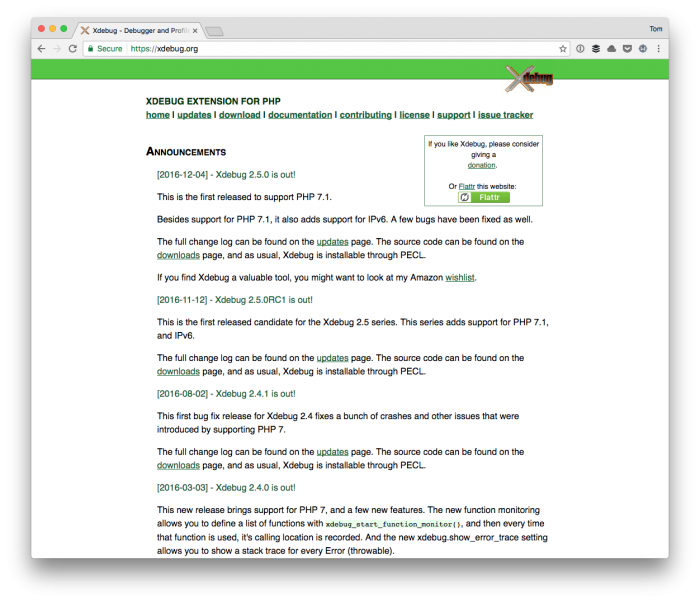
Understanding WordPress Error Logs: Xdebug

Ultimately, using a tool like Xdebug is indispensible, but we have to work up to that (for those who are curious, I wrote a brief guide about this a little over a year ago).

For now though, let’s start with the basics. In the previous post, I left with the following statement:

In the next post, we’ll start looking at what’s necessary to examine the error log that’s generated by WordPress and how to understand the information we see.

And that’s what I want to look at today because, if nothing else, it will give you something practical off of which to work.

Continue reading

What’s the Purpose of a Boilerplate?

Regardless of the library, framework, or code with which you work, you’re likely going to encounter the concept of a boilerplate at some point.

There are a handful of them for WordPress, right 🙃?

But it seems to be an increasingly popular trend that people are creating more and more boilerplates, which isn’t inherently a bad thing, but that there may be confusion as to the purpose of a boilerplate.

The Purpose of a Boilerplate

Photo by NeONBRAND on Unsplash

So, as defined by Wikipedia (which I think offers a great definition):

In computer programming, boilerplate code or boilerplate refers to sections of code that have to be included in many places with little or no alteration. It is often used when referring to languages that are considered verbose, i.e. the programmer must write a lot of code to do minimal jobs.

But notice there’s a phrase that should not be missed. Specifically:

…that have to be included in many places with little or no alteration.

And in some observations I’ve seen within the WordPress economy, at least, boilerplates seem to require that code be removed, modified, or stripped away rather than simply included or added.

That’s what I hope to clarify.

Continue reading

Using the Registry Pattern in WordPress

I’ve had a few conversations with various friends and others on Twitter about the notion of global variables in programming languages. For those who are new to programming or who are unsure as to why they are bad:

The use of global variables makes software harder to read and understand. Since any code anywhere in the program can change the value of the variable at any time, understanding the use of the variable may entail understanding a large portion of the program.

This isn’t to say they don’t have their use, but if you’re interested in object-oriented programming (especially in a WordPress setting where you’re going to be using PHP), then it’s important to understand some better alternatives than global variables.

That is, there are ways to work with passing data around your application without the need for global variables. And one such way is the registry pattern.

Continue reading

Native WordPress Debugging Tools That Don’t Require an IDE

If you’ve just happened to join up on the membership of the site and are pursuing content specifically for The Independent WordPress Developer, I recommend reading the previous post – at the very least – to prepare for content in this post.

If, however, you’re looking to catch up on the previous article, here’s a short list of everything that’s been written thus far:

  1. Local Development for the Indie WordPress Developer
  2. Databases and Tools for the Indie WordPress Developer
  3. Installing WordPress for Local Development

As we prepare to move into talking about more advanced topics such as debugging and IDEs, it’s first worth noting the tools we have tools available that we can install within WordPress that will help us with debugging issues during development.

Native WordPress Debugging Tools: WordPress

Further, these issues are not related to strictly PHP issues. These also include JavaScript issues. And to take it one step further, there are ways in which we can configure WordPress natively so that it outputs errors directly to our browser.

So before we look into error logs, IDEs, Xdebug, and so on, we’ll take a look at what we can do within WordPress itself.

Continue reading

« Older posts Newer posts »

© 2026 Tom McFarlin

Theme by Anders NorenUp ↑