Where Can I Watch? started as a way to answer one question:
Where can I actually stream the title I want to watch?
But over the last few releases it slowly turned into something else, too. Once you can save shows, track them by episode, and see what airs today, the app stops being a lookup tool and starts being the place you keep track of what you’re watching.
Which created a new problem – one I kept running into myself: I could open the app and see everything I was tracking, but not where I actually was in any of it. I’d start an episode, get pulled away, come back a few days later, and spend time figuring out which one was next.
1.6.0 is about fixing that.
Currently Watching
There’s a new rail pinned to the top of your Watchlist called Currently Watching.
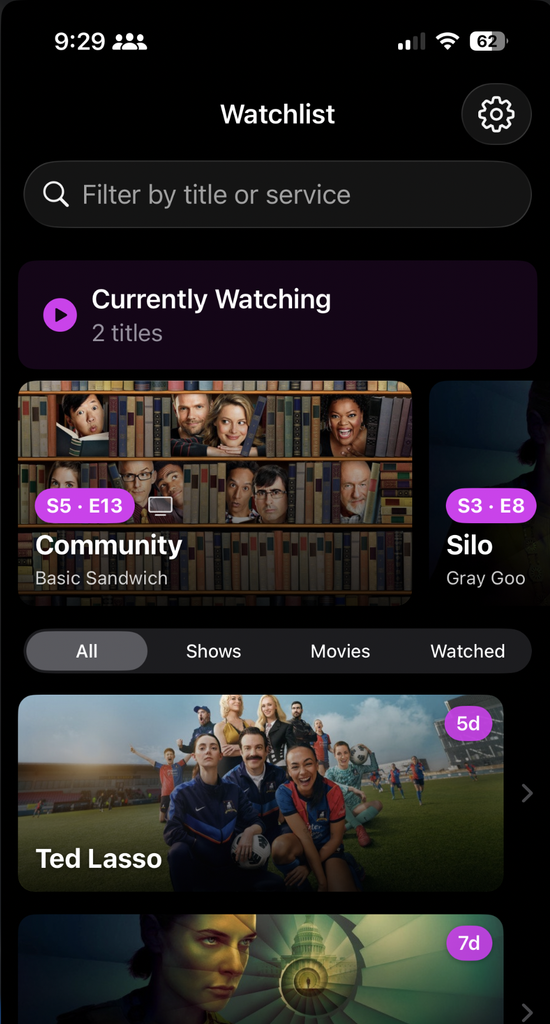
It’s for the one or two shows you’re actively in the middle of watching; not everything you’re tracking, just the ones you’re watching right now.
Each card shows your next episode to watch. Not the most recent one that aired, and not wherever a show’s official “next episode” pointer happens to be. It’s the next episode you haven’t seen yet, worked out from the episodes you’ve already marked. So the card doesn’t say “here’s the latest,” it says “here’s where you left off.” And that’s the whole point.
A few decisions worth sharing:
- It’s manual. You add and remove shows yourself. The app doesn’t guess what you’re “currently” watching, because I’ve never seen an app guess that well.
- It stays out of the way. The rail is hidden entirely until you add something, so a brand-new watchlist doesn’t get a big empty shelf at the top.
- It’s TV only. Movies don’t have a next episode to resume to, so they’re not eligible. I’d rather the feature do one thing honestly than stretch to cover a case it can’t.
The question I actually ask when I reach for the app isn’t only “where can I watch this.” Half the time it’s “wait, which episode am I on?” Now that answer is the first thing I see.
Adding and Removing Shows
Moving a show in and out of Currently Watching uses the same gestures as everything else on the Watchlist — a swipe or a context menu on the row — so there’s nothing new to learn.
Removing has one nice touch. When you take a show off the rail, you get an optional prompt asking if you also want to update its Watchlist state at the same time because “I finished this” and “I’m not actively watching this anymore” are often the same moment. But it’s optional: by default, removing a show from the rail leaves your Watchlist exactly as it was.
One Menu for Watch State
On a show or movie’s detail page, the separate Tracking, Watching, and Watched buttons are now a single status menu. It’s less to look at, and it makes the states feel like what they actually are instead of a row of buttons you have to decode.
A Welcome Tour, and a Small Nudge
New users get a refreshed onboarding tour that covers Currently Watching alongside the rest of the app as it exists today.
The trickier audience is everyone who already has the app and would otherwise never see that tour. For them, there’s a small one-time tip on the Watchlist that points to the new rail which is enough to say “this is here now,” and then it gets out of the way. Nobody should have to reinstall an app to find out what changed.
Smaller Things
- Your resume episode now updates the instant you mark one watched, instead of waiting for the view to rebuild.
- VoiceOver labels for the rail cards, the new status menu, and the Share button.
- The resume pill puts the season and episode number with the episode name on its own line, so it stays readable at large text sizes instead of getting crushed.
- The leading swipe no longer allows a full swipe, so you can’t accidentally mark an episode watched by flicking a little too hard.
- Rail cards open with the same zoom transition as Trending, so tapping in feels consistent across the app.
What’s Next
The thing people ask me for most is syncing: a watchlist that follows you from your phone to your iPad without thinking about it. That’s what I’m building next, on top of iCloud, so your list and your progress stay in one piece across your devices. It’s the biggest plumbing job the app has taken on, so it’ll take a bit, but it’s the right next step.
Where Can I Watch? 1.6.0 is free on the App Store. No ads, no accounts, no subscriptions — every feature is there for everyone. It uses data from TMDB, and if you use the app and something’s off, or there’s a show whose next episode it’s getting wrong, I’d genuinely like to hear about it.
