Where Can I Watch? started off as an app with a single purpose: tell me what service is streaming a show or movie. But the more I used the app (and the more a few users contacted me), the more it made sense to also track all of the shows and movies that are being watched. And with shows, there are obviously multiple episodes and, for most, multiple seasons.
So in the latest version, in addition to fixing a few things, I added per-season episode tracking. 1.2.0 has shaped up to be the biggest feature release since the initial launch of the app.
What’s New
Per-Episode Tracking
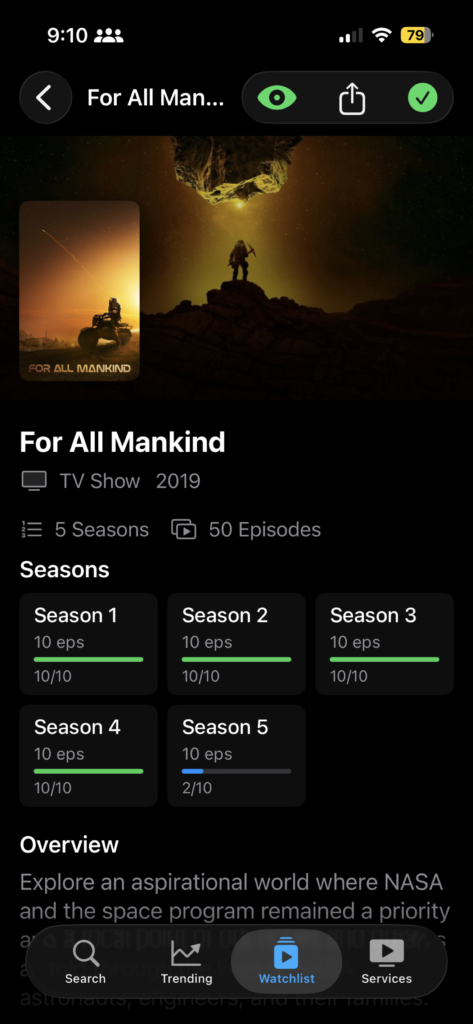
This is the primary new feature of the release. Every TV show in your watchlist now has a Seasons section on its detail page. Each season card shows the episode count and a progress bar showing how many you’ve watched out of how many have aired.
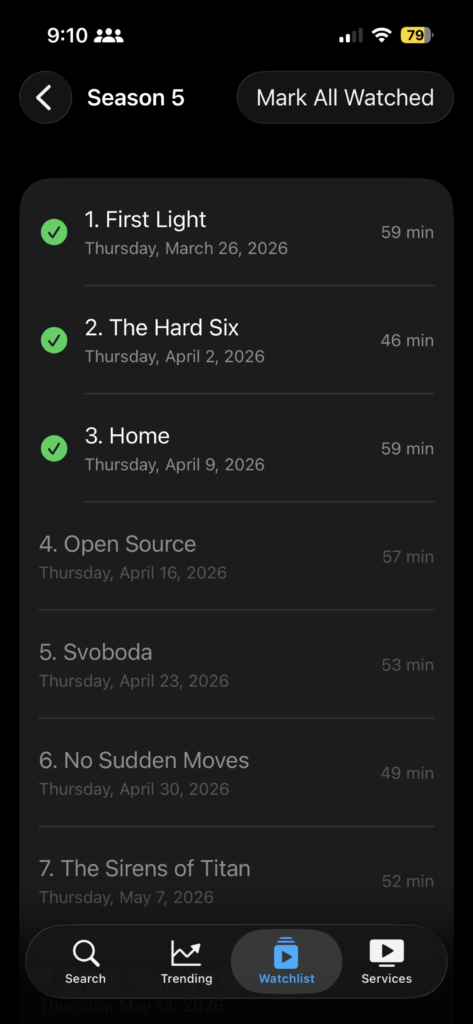
Tap into a season and you get the full episode list: name, air date, runtime, and a watched toggle. Mark episodes individually or hit “Mark All Watched” at the top if you’ve already binged the whole thing.
The progress is persistent. It’s stored locally via SwiftData, so it survives app restarts and doesn’t require an account. If you remove a show from your watchlist, the episode data is cleaned up automatically.
This was the most requested feature since launch, and it’s the one I personally wanted most.
Auto-Transition for Returning Shows
Here’s a small one that saves real friction: If you mark a show as “Watched” and it later comes back with a new season, the app automatically moves it back to “Tracking” during the next airing info refresh.
Before this, finished shows would sit in your Watched filter silently accumulating new episodes with no indication. Now the app is set up so if there’s something new to watch, you’ll know about it.
Artwork Refresh
Poster and backdrop images for watchlist items now update when they change on TMDB. Previously, if a show got new key art mid-season, the app would keep showing the old image indefinitely. The airing info refresh now checks for updated paths and clears stale cached images.
What’s Fixed
Badge Count Inflation
This was an interesting one to solve (as interesting as it was frustrating). Say you had three shows with episodes airing on the same day, you’d get three correct banner notifications. But the badge on the app icon might show 9 instead of 3.
The root cause was that badge values were baked into each notification at scheduling time based on deliveredNotifications().count, which conflates Notification Center state with badge state. (Maybe this is a rookie mistake in iOS development.)
The fix introduces a lastOpenedDate approach: badge values are now computed as a count of episodes airing since you last opened the app, completely independent of Notification Center.
What’s Next
As of now, 1.3.0 is shaping up to focus on an overhaul of the detail page. This means I’m looking at adding content rating badges, runtime info, and a persistent image cache to make the whole app feel faster on repeat visits.
If you haven’t tried it yet, Where Can I Watch? is free on the App Store. No ads, no accounts, no subscriptions. Just search, track, and watch. And if you have Android or are looking for just the base functionality of easily finding where a show is streaming, you can use the web app.
