Software Engineering in Web Development, Backend Services, and More

Tag: WordPress (Page 63 of 220)

Articles, tips, and resources for WordPress-based development.

WordPress Admin Columns Made Easy via Admin Columns Pro

When working with WordPress plugins, the software should aim to solve a problem that a given type of user is experiencing. Granted, some plugins are more nuanced than others.

Take, for example, the idea of the various tables, lists, and columns available in the admin area of the WordPress dashboard. When working with WordPress admin columns, a good solution should expand the core functionality of WordPress and do so in an unintrusive way.

That’s what Admin Columns aims to do.
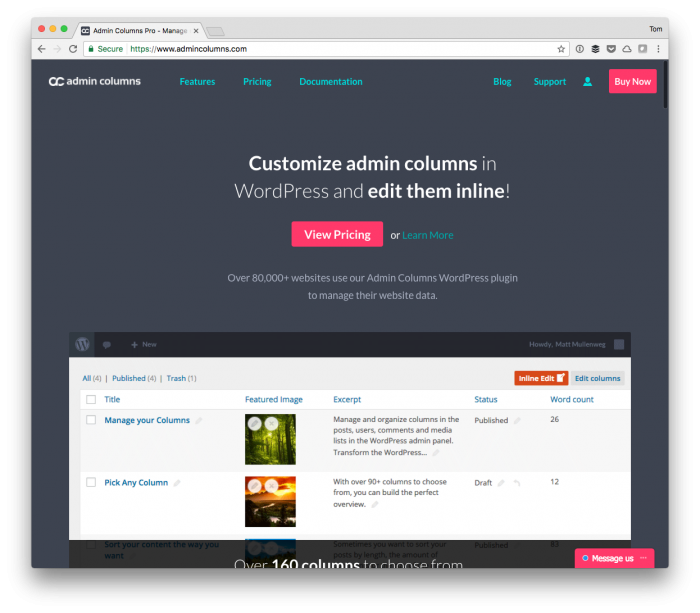
WordPress Admin Columns: WordPress Admin Columns: Admin Columns Pro

To elaborate, Admin Columns allows you to manage columns in your WordPress admin area. You can create, edit, and remove columns from the overview pages of blog posts, pages, users, comments, categories, and more. All custom post types and taxonomies are supported by the plugin.

Since 2011, the free version of the plugin has been available and installed on 80,000 WordPress-based sites; however, the latest release of Admin Columns Pro introduces many additional features.

Some of these include:

  • sorting,
  • filtering,
  • inline editing,
  • import and exporting columns.

But there’s much more to it than that. I’ve had the pleasure of speaking with David on behalf of the development team and am stoked to share what they’ve built for the lastest version of this project.

Continue reading

WordPress Plugin Interfaces: Working With Assets

One of the advantages of working with object-oriented programming is the ability to define interfaces so classes that implement those interfaces have a strict set of functions that said classes must implement.

WordPress Plugin Interfaces

That is the definition of a class interface, anyway:

An interface is a contract specifying a set of methods, fields and properties which will be available on any implementing object

But how might this look if we’re aiming to create a namespaced solution for including WordPress plugin interfaces (or an interface) for a class that can be used to enqueue stylesheets or JavaScript files?

Continue reading

Globally Installing WP-CLI for Access Across Your System

When working on WordPress-based projects that utilize Composer, there are times that we’re going to want to have certain dependencies available for our project and there are times where we’re going to want to have tools available throughout our system.

For example, for some projects, we may want to have PHP CodeSniffer with the WordPress Coding Standards available. For others, maybe not.

But having a tool like WP-CLI is something that’s likely better served when it’s available throughout the entire system rather than on a project-by-project basis. Globally installing WP-CLI is a relatively trivial matter.

It does, though, assume you have Composer already installed and available on your system.

Continue reading

Properly Filtering Post Content (And Understanding apply_filters)

Now and then, whenever I’m working with pre-existing source code or performing a code audit, I’ll see others modifying the post content of a post object like this:

At this point, some will drop in and immediately say you’re doing it wrong. I hate that phrase (and it’s even littered throughout the WordPress codebase, but I digress).

There are ways to use other existing WordPress API functions to sanitize the data before setting it equal to the value of the post_content attribute, using those functions isn’t the best way to go about doing it.

Instead, we all should be using apply_filters. The problem? Some don’t know, some don’t know how it works, and some don’t know how to use it. That is it’s not clear how to go about properly filtering post content.

Properly Filtering Post Content

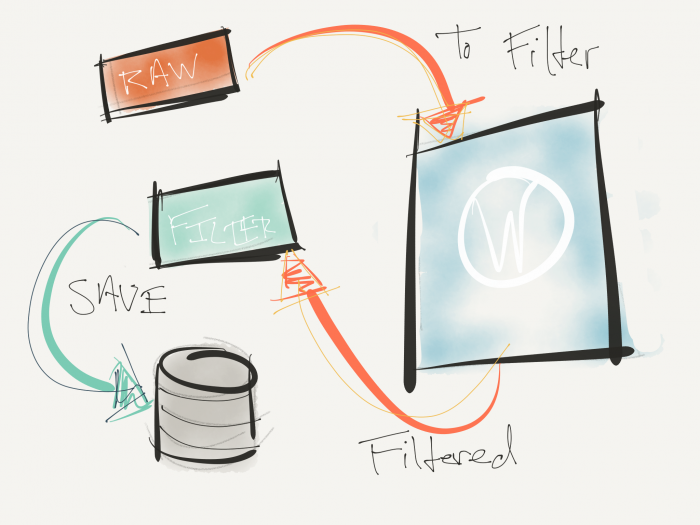
Raw content filtered by WordPress then written to the database.

But for those who may fall into any of the categories above, then perhaps this can help.

Continue reading

What Does It Mean to Use WordPress as a Proxy?

If you’ve worked with WordPress for any length of time especially when it comes to using some type of Ajax functionality, then you’ve likely heard the phrase “use WordPress as a proxy” at some point.

And even if you haven’t the odds that you’ve actually done it are pretty high.

Though I think that, as time moves forward, we’re going to eventually see the REST API replace the traditional ways that we’ve used Ajax but that’s likely a different story for another time.

So what does it mean to use WordPress as a proxy whenever you’re working with Ajax requests? It requires a little bit of understanding cross-site requests, how routing a request through WordPress works, and then parsing the response.

Continue reading

« Older posts Newer posts »

© 2026 Tom McFarlin

Theme by Anders NorenUp ↑