Software Engineering in Web Development, Backend Services, and More

Tag: WordPress (Page 120 of 220)

Articles, tips, and resources for WordPress-based development.

Quick Tip: Searching Custom Post Types

Say what you will about the built in WordPress search functionality – sure, it could stand to be improved (personally I’m a fan of SearchWP) – but not all projects warrant the same requirements, right?

Sometimes, the built-in search functionality works just fine out-of-the-box. It gets a little more involved if you start introducing, say, custom taxonomies or custom post types, though.

That is, say you’re working on a project or have a client who needs help with modifying the built in search functionality so that it allows for searching custom post types. There’s actually a lot of flexibility provided in how you tailor the search results, but for this case it’s pretty easy. Continue reading

Managing Tab Events in Bootstrap 3

Yes, there are a lot of front-end frameworks that are available for use in WordPress development, and no I wouldn’t say I have a favorite (though I tend to use Bootstrap or Foundation for most of my work, at this time).

At the time of this writing, I’m currently working on a project in which I’m using Bootstrap 3.3.5 to handle the front-end.

Bootstrap

Part of the project calls for use of the tab functionality in such a way that you can, y’know, tab through several panes of information without actually leaving the page.

If you’ve ever used Bootstrap, you know it’s easy to setup and integrate into a project; however, if you’re looking to introduce more complicated functionality such as having to make asynchronous requests whenever the pages tabs change and then you need to update the DOM accordingly, it can actually be a little frustrating in nature.

Sure, there are some ways in which you can track which tab is active – class names, using hidden fields, etc., but depending on how you’ve architected the front-end and what’s happening with the Ajax response, you may actually end up with needing to do something a little more advanced than that.

Generally speaking, whenever I’m working with JavaScript and I’m trying to handle an asynchronous event (or even synchronous events, for that matter), I want to use exactly that – events.

But when it comes to needing to handle when a tab has been changed to toggle a pane in Bootstrap, what event do we use? again hanks

Continue reading

Quick Tip: A Way to Work Well With Designers

If you’re a developer working in WordPress, then odds are you’ve spent time working with designers. Assuming you’re working with a good designer, it can be a lot of fun.

I think we’ve all had our share of experiences both good and bad (and luckily I’m at a point where I’m working with some really great designers), but I think there are things we – as developers – can do to help make our designers jobs a little bit easier.

Continue reading

Highlight Text in the WordPress Editor

A couple of weeks ago, I worked through a series of posts on how to write a TinyMCE plugin for the WordPress editor (since the WordPress Editor is TinyMCE).

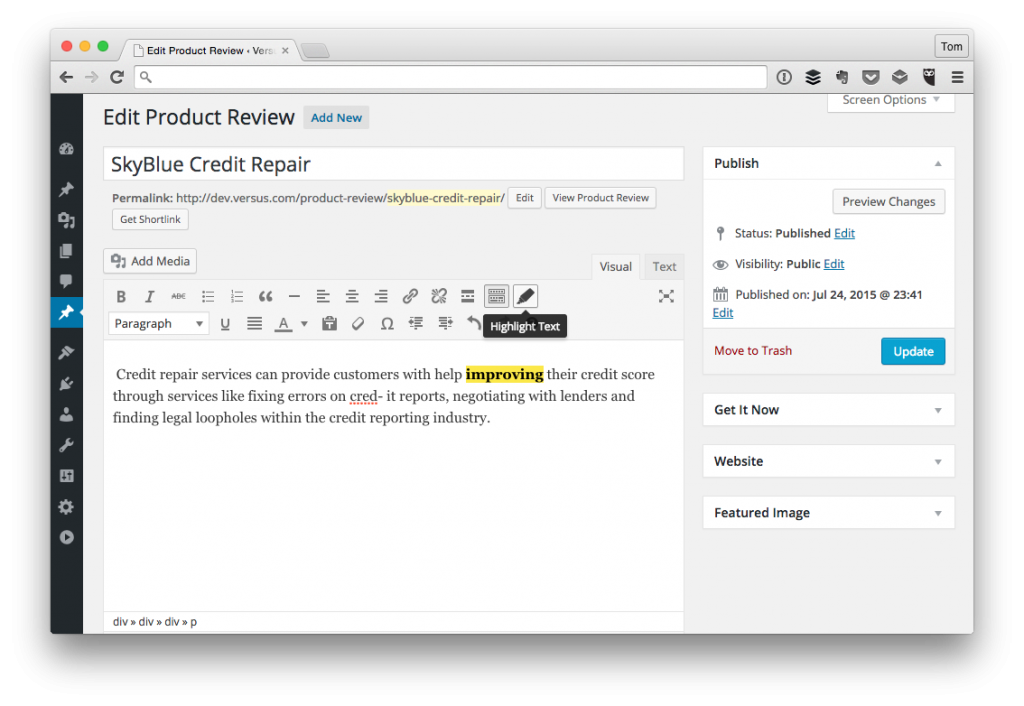
In a recent project, one of the things that I needed to a build was a feature that allowed users to highlight text such that they would select the text in the editor (you know, with their mouse), click on a “Highlight Text” button in the toolbar, then have the text highlight.

Highlighting Text in the WordPress Editor

And, naturally, it would return to its normal state of being un-highlighted if the text is selected and then the toolbar button is clicked again.

Though there’s no reason to share how the plugin is built in its entirety, I thought I’d walk through how I added the new command to the toolbar and used the HTML5 mark tag to include this functionality.

Continue reading

The Dangerous Nature of WordPress Comments (And What I’ve Learned)

When it comes to posts like this, I often deliberate for weeks on whether or not I should write them because of the various discussions that it will inevitably cause and the blowback that can occur can often times be exhausting (even if it’s deserved).

But that’s not this kind of post. This is a retrospective of my own mistakes, my apologies, and what I’ve learned about moving forward in certain types of situations. More on that in a moment.

Right about now is when the defenses start to go up. Please don’t go into this post with that attitude as it’s not at all about anyone or anything but me. If you already feel like you’re on the defense, take a look at this cool picture taken at River Street in Savannah, Georgia.

Once you’ve calmed down, keep reading :).

River Street in Savannah, Georgia

River Street in Savannah, Georgia

Okay so before I write any more, don’t get me wrong: Discussions in and of themselves are generally good things to have (except when they go south, but that’s common sense, right?), but right now it appears that WordPress is in a volatile state with regard to various opinions, perspectives, and so on.

Those who follow along with blogs, Twitter, and the like know what I’m talking about. People are being harassed, people are being disrespected, and – for some – it’s more about trying to make a point than it is trying to listen to the points other people are making.

Such an incredible bummer, isn’t it? It’s beyond that, really, but words fail me here.

This should go without saying, but WordPress is representative of many different people of all different walks of life and rather than use that diversity as a way to better ourselves and to grow as people, some are using it as a platform to continually argue points that aren’t productive.

Thus far, I don’t think I’ve said anything new. In fact, I’m talking more about other people than I am myself and, for this particular post, I wanted to actually talk a little bit about myself.

Specifically, I want to talk about:

  • The mistakes I’ve made,
  • The things I’ve learned,
  • And how I’m trying to get better all thanks to the people who I’ve met through WordPress.

So here goes.

Continue reading
« Older posts Newer posts »

© 2026 Tom McFarlin

Theme by Anders NorenUp ↑