Software Engineering in WordPress, PHP, and Backend Development

Category: Articles (Page 156 of 258)

Personal opinions and how-to’s that I’ve written both here and as contributions to other blogs.

Using The Google Maps API and WordPress

One of the challenges that comes with working with any new API is learning how to use it. And by that, I mean generally overcoming the learning curve – and I believe that this

Some libraries and frameworks have some relatively easy APIs once you grok the basics (and I think WordPress falls into this camp), and others don’t necessarily have the easiest APIs (such as, say, Google Maps).

The thing is, it’s different for all of us. What’s easy for me may not be easy for you and vice versa, and that’s okay. I think we need to stop treating one another as if it says something about our intelligence if we aren’t able to pick up something as fast as someone else.

That’s probably content for another post.

Anyway, for the past few months, I’ve been doing more work with the Google Maps API than I’ve ever done thus far in my career. All of the work as been done within the context of WordPress, but none of it has been WordPress-specific.

By that, I mean that the work that I’ve done is used within a WordPress plugin but there’s nothing that requires WordPress for it to run – the code could be abstracted and generalized into a standard PHP application and used.

I don’t write about that, though. I tend to keep my focus on what it’s like to work with WordPress in a professional capacity. So over the next few posts, I thought it might worth taking a look at some of the ways that you may want to employ the Google Maps API in your project, what it entails, and how to get started with it so you have some clue as to what you’re doing whenever you need to build something with the API.

Continue reading

The Best Way To Release a New Feature

When it comes to launching the final version of a product be it a theme, plugin, or a web application regardless of it’s built on WordPress or not, source code control can be a life saver.

This is why most developers live and die by the source control system that they use.

Before going any further, this isn’t a debate as to which is better – Subversion, Git, Mercurial, whatever – as long as you’re versioning and tagging the code that you’re working on, you’ve got something to rollback to using if something goes wrong with your latest build.

Imagine that you’re in the following scenario:

You’ve got a project that you’ve been working on for a few weeks or for a few months and it’s about to go live. Everything is working great.

Then, shortly after it launches, something needs to be changed. And this isn’t like a small grammatical change. Instead, this is a change that requires some major refactoring and possibly the re-architecting of a significant feature.

Sure, you hope everything goes well, but there’s far more to it than that if you want to it do it correctly.

So what is the best way to go about doing this? Continue reading

When You Are Subpar

One of the really neat things about working in the software development industry is that we have the ability to be as engaged with other people as much as we want or not.

That is, we have the ability to chat with people via Twitter, IRC, or Skype, and we have the ability to learn and educate other people through blogs, screencasts, meet-ups, and so on.

But all of this comes at a cost: We can get near instant feedback while in the process of giving a talk or after people have viewed a course that we spent hours preparing and editing.

Case in point, I recently received some feedback that said something along the following:

You speak in lightening speed with copy/paste codes.

Perhaps I do talk fast (though I deliberately try not to do so), and I certainly do not use “copy/paste codes.” But anyway. I digress.

Years ago, this would have been something that would have seriously bummed me out. I mean, here I am pouring my energy into trying to help other people learn something and it wasn’t well-received.

But now, years later, that’s not the case.

Continue reading

Validation and Sanitization in the WordPress Settings API

This post is part of a series on Sanitization with the WordPress Settings API. Here is Part 5.

Assuming that you’ve been following along with the majority of the posts in this series, then you know that we’ve been looking at ways to handle input sanitization and serialization in the WordPress Settings API from an object-oriented perspective.

As of now, we’ve got all of the necessary pieces for doing so, but we’ve not actually tied them all together. So in this post, I’m going to aim to do that in one of the many different ways this can be done.

I’ll talk about how to do it using the code we’ve written as well as some more advanced improvements that can be made were you to take this a few steps further.

Continue reading

Validating Input via the WordPress Settings API

This post is part of a series on Sanitization with the WordPress Settings API. Here is Part 4.

Up to this point, everything we’ve talked about regarding the WordPress Settings API and saving data to the database has been based around two ideas:

  1. We need to sanitize the input
  2. We haven’t been concerned with any particular fields being required

At this point though, we’re ready to start talking about how to tackle this particular issue. Since we’re already familiar with how to sanitize the data, we’re going to build off of the code that we already have.

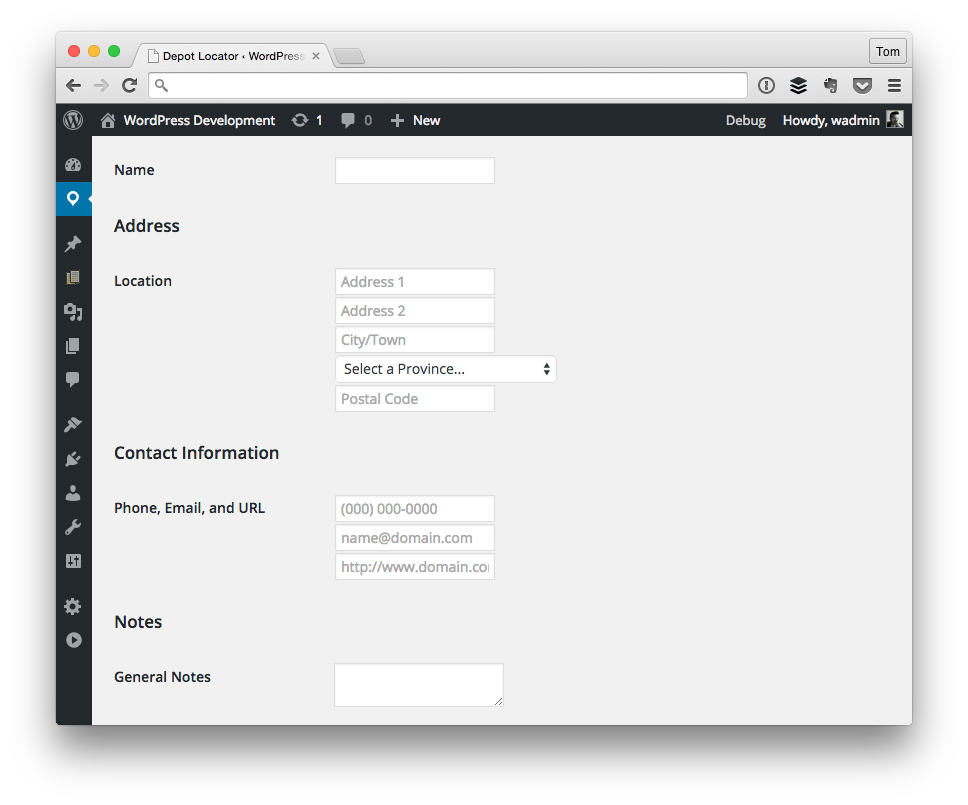
An Example Settings Page

An Example Settings Page

That is, we’re going to look at how to validate the following fields:

  • Address 1
  • City
  • Postal Code

Furthermore, we’re going to see how to tackle this from an object-oriented approach, we’re going to look at what’s needed in order to add an error message if the required input is invalid, and we’re also going to look at how to prevent saving information to the database if it’s empty or invalid.

Continue reading

« Older posts Newer posts »

© 2026 Tom McFarlin

Theme by Anders NorenUp ↑