Software Engineering in WordPress, PHP, and Backend Development

Author: Tom (Page 308 of 429)

Deep and Wide: The Tension of Software Development

One of the things I talk a lot about both with small groups of friends and during speaking events is the idea of going deep rather than wide.

In the context of software, I’m typically referring to the idea of going extremely deep within the languages and tools that you’re using on a daily basis so that you may become the best developer that you can possibly be in that area.

But there’s a tension that I think most programmers feel and it’s that there are so many neat things out there to learn. Couple that with the fact that others can sometimes make us feel inferior if we don’t know what they know, the tension grows even stronger.

I’m not sure if I’m making much sense.

Continue reading

WordPress: Fatal Error Memory Exhausted

At some point, anyone building a theme, plugin, or even just working with WordPress has seen the Fatal Error: Memory Exhausted message. It typically reads something like this:

Fatal error: Allowed memory size is 268435456 bytes exhausted (tried to allocated 29596635 bytes) in …/wp-includes/wp-db.php on line 885.

Yes, your message may be a little different, but the point is the same: You see a fatal error, it has something to do with the amount of memory allowed, how much was attempted to be allocated, and what file threw the error.

In my opinion, one of the big problems with errors like this is that it’s far too easy to Google for a quick solution to fix the problem rather than truly understand the problem.

Sure, I understand we’ve got stuff to do and work to get done, but understanding what the problem may be is important to helping us become better developers, and, who knows, we may uncover a bug in a piece of open source software.

In this case, it’s not the latter, but here’s a good way to go about understanding the above error.

Continue reading

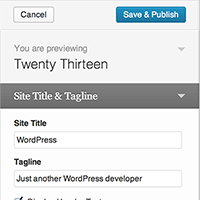
A Guide To The WordPress Theme Customizer

Comments on are closed on this post so we can keep the discussion on the original articles.

One of the neatest, and nicest features of WordPress (since 3.4) has been the WordPress theme customizer.

In fact, I’m such a fan of it that I think that it has the potential for us to decrease or even remove our theme options pages by giving users all of the tools they need straight in the Theme Customizer.

But as with any new feature or API, there’s a lot to learn and things to understand about how it works, how to implement it in our day-to-day work, and how to use it in place of APIs we previously used.

So in my latest series on WPTuts+, I’m looking at doing exactly that.

Continue reading

The scrollUp jQuery Plugin (And Placing The ‘Scroll To Top’ Button)

Whenever I’ve been asked to build a landing page or put a single-page site together for someone, one of the ways that I’ve occasionally implemented navigation is by using the scrollUp jQuery Plugin.

In short, it’s a simple plugin that gives a nice effect such that when the user clicks on a navigation link, the plugin will display a ‘Back To Top’ option in the bottom right corner of the screen.

Nothing too complicated, but it’s well implemented and I’m a fan. The thing is, sometimes the ‘Back To Top’ anchor can interfere with certain footer elements.

Continue reading

Category Sticky Post 2.1.0 – Support For Post Types

About six days ago, I released Category Sticky Post 2.0 that resolving a few bug fixes, and that introduced the following features:

  • Resolving a bug that marked the category as ‘unstuck’ when updating a post
  • Introduced a feature for disabling the category sticky border
  • Improving the coding standards of the plugin be separating the class into its own file
  • Improving the PHPDoc of the plugin

This morning, I just released Category Sticky Post 2.1.0.

Continue reading

« Older posts Newer posts »

© 2026 Tom McFarlin

Theme by Anders NorenUp ↑