About nine months ago, I wrote a case study about building TuneLink – a web app that converts music URLs between Spotify and Apple Music. The original post covered everything from the matching algorithms to the tech stack to my thoughts on using AI as a development accelerant.
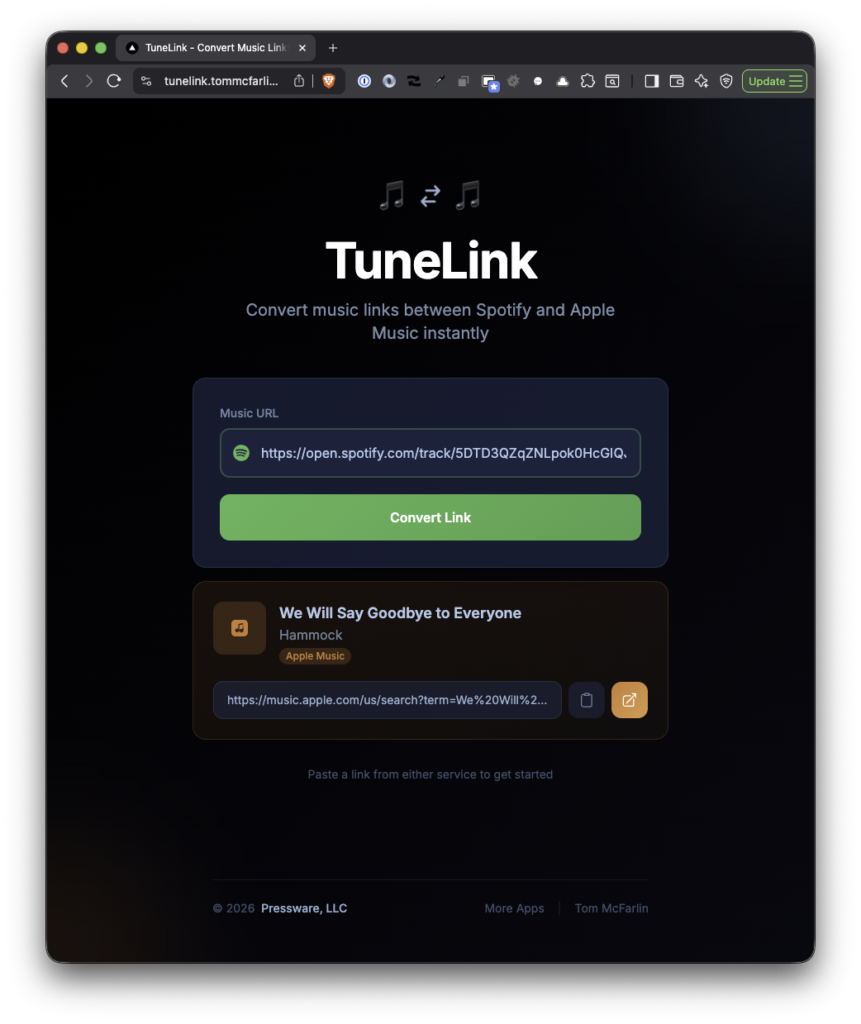
Since then, I’ve made a few updates:
- the domain moved,
- the UI got a complete overhaul,
- performance was optimized for both desktop and mobile as benchmarked by Lighthouse
And I’m currently toying with the idea of converting it into a small service that will expose an API of sorts to allow third-party (well, very limited third-party) access to the site.
If you’ve been using TuneLink or just read about it last year, here’s an update.
Why Change Domains?
TuneLink originally lived at tunelink.io. It now lives at tunelink.tommcfarlin.com.
Why, though? Consolidation and frugality. I have a handful of small utilities and side projects scattered across various domains, and maintaining them all separately was getting tedious. Plus, I don’t want to pay for domains (or other infrastructure) for projects that aren’t yielding any type of return to support them.
Moving TuneLink under my personal domain simplifies things – one less domain to renew, one less set of DNS records to manage, everything lives under a single umbrella, and it costs less.
The functionality hasn’t changed. If you had the old URL bookmarked, you’ll want to update it. Otherwise, everything works exactly as it did before.
The UI Redesign
The more noticeable change is the interface itself. The original TuneLink was functional but utilitarian – a white background, basic input field, and straightforward result display. It worked, but it didn’t exactly feel like something I’d want to use repeatedly. It looked like a standard developer UI but in dark mode (and that’s not a good thing).
The new design is darker, cleaner, and more visually interesting. It actually feels like a more modern single-page web app rather than a quick prototype.
Beyond aesthetics, I added a few quality-of-life improvements:
- Service-aware theming: The UI subtly shifts colors based on whether you’re converting from Spotify or Apple Music.
- Loading feedback: Instead of a blank screen while waiting for results, there’s now visual indication that the app is working.
- Deep linking: Buttons to open the matched track directly in the Spotify or Apple Music app, with fallback to web if the apps aren’t installed.
- Better error messages: Clearer feedback when something goes wrong, whether it’s an invalid URL or a track that doesn’t exist on the target platform.
The deep linking piece is particularly useful on mobile. Previously, you’d get a URL, copy it, and manually navigate to your music app. Now you can tap a button and go straight to the track.
What’s Coming Next
The most significant change on the roadmap is making TuneLink’s matching functionality available as a service that other applications can use.
Right now, the only way to convert a music URL is to visit the website and paste it into the input field. That’s fine, but it’s not the only context where this kind of conversion is useful.
Think about clipboard managers, menu bar utilities, or automation tools. Imagine copying a Spotify link from a message and having your system automatically offer to open it in Apple Music instead. Or a keyboard shortcut that converts whatever music URL is in your clipboard and opens the result in your preferred app.
These are the kinds of workflows that don’t need a web browser. They belong in lightweight utilities that run quietly in the background.
To make that possible, TuneLink will expose a simple endpoint that accepts a music URL and returns the matched URL on the other platform. Any application that can make a web request will be able to use it. Of course, I may just lock this down with my own credentials for the obvious reasons that come with exposing a publicly available API.
Regardless, the foundation is already there. The matching logic that powers the website is the same logic that will power the service.
I’m also considering batch conversion for handling multiple URLs at once. My thought process is that it would be useful for anyone wanting to convert entire playlists rather than individual tracks.
Conclusion
TuneLink is a small utility that solves a small problem and was built primarily as a vehicle for learning. It doesn’t need to be more than that. But making it more accessible – through a better interface and availability to other applications – means it can fit into workflows beyond just visiting a website and pasting a URL.
If you’ve used it before, update your bookmark. If you haven’t, give it a try next time someone sends you a music link from the wrong platform or a platform that you don’t use.
