There are a lot of opinions on how return statements should work.
Some say that there should be a single point of return in a function,
Some day we should return as early as possible,
Some day multiple return statements are fine,
And some say that, when applicable, return as early as possible.
I’m sure I’m missing some, but all of these are ones I’m sure the majority of you have seen. And though I don’t hold either of these to be law, I think there’s a time and a place for each.
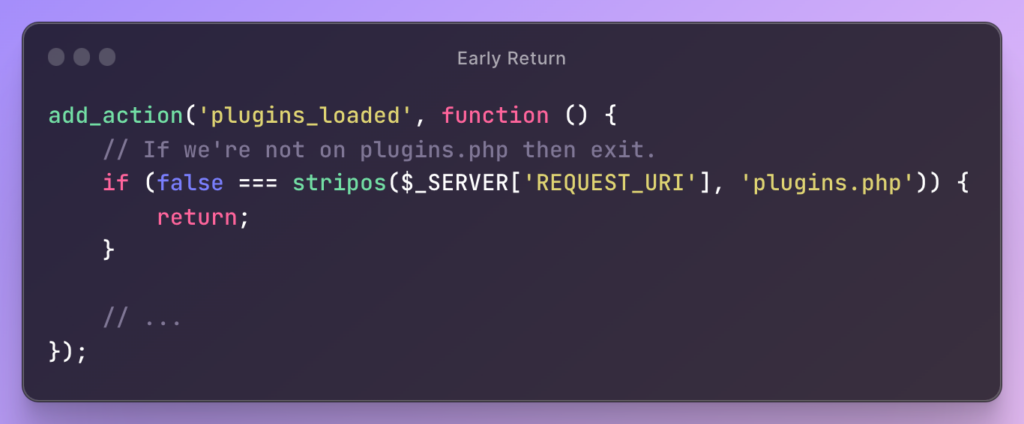
I’m a fan of the early return statement. In my mind, the sooner we can determine we don’t need to do the work of a function, the better we just leave.
For example, say we know if we’re not on a certain page, we can go ahead and leave the function:
In this case, it makes sense because:
You only want to perform work on the plugins.php page,
The amount of work to be done in the function is larger than what should ever fit within a conditional.
But there’s an alternative when the amount of work is less than what’s above.
Over the last year or so, the term “WordPress adjacent” has become more popular to use. And I get it. There are a lot of us who are still heavily involved with WordPress but who are building tools and/or solutions that may not only interact with WordPress or that start with WordPress and fan out from there.
So that phrase, as they say, has entered the chat. And it’s not a bad phrase, per se. But I think it’s imprecise and I think we can do better. This is important for those of us who write, podcast, speak, and any or all of the above.
First because I believe it’s important for us to be able to clearly define about what we’re talking and how it relates to WordPress. And secondly, so that our audience can follow it.
Imagine thinking you’re going to hear someone talk about building headless applications in WordPress and all that comes with that only to hear that a backend engineer is going to be talking about building a utility that incorporates Google Cloud Functions and custom endpoints to send data to a cloud-based database and to a WordPress database, too.
All of that falls under the umbrella of WordPress Adjacent. And that’s why it’s not good enough. It’s why we need to more more precise.
What Does It Mean to Be WordPress Adjacent?
Starting a more broadly, I would say, at it’s core, being WordPress adjacent refers to individuals or projects closely associated with WordPress, either through direct use or integration with technologies related to the core application.
It’s straightforward enough, but it’s a mouthful, isn’t it? Trying to throw this into a presentation or a podcast and you’re going to lose half your audience.
This person just checked out of your talk. Photo Credit.
Here’s why I say that: In their mind, people already have what it means to be WordPress adjacent. So when what you describe doesn’t map to what they think, it feels like someone is wrong or perhaps being misunderstood.
There’s no reason to feel that way but this is why I think we need a level of precision. Ultimately, there’s a myriad of ways one can be WordPress adjacent.
Lack of Precision is Frustrating (Why Wouldn’t It Be?)
The imprecision of the term WordPress adjacent is both a blessing and a curse. On one hand, it allows for flexibility, acknowledging the diverse roles and projects within the WordPress ecosystem.
On the other, this vagueness can lead to confusion. Imagine trying to explain your job to someone using this term – chances are, you’d end up providing a convoluted explanation that leaves the them more confused than not.
Okay, so How Do We Address It?
In my experience backend engineer, I’ve found myself involved in projects that are WordPress adjacent. And there’s certainly been an uptick in that in the last few years. Further, I’m grateful for it because it allows me to continue to grow as an engineer with learning other technologies, integrating them, and then having them still communicate with WordPress.
Case in point. Imagine, databases with a master and development branches all accessible via PHP or cloud functions.
From developing custom APIs that communicate seamlessly with WordPress installations to creating data systems all of which ultimately increase the functionality of WordPress websites.
Stuff like this orbits WordPress without directly living only within it.
And so that’s how what I do is WordPress adjacent. It may be how the work you do is too. But it’s not the same for all of us.
Clarifying Our Roles
So, how do we address this ambiguity? When we use the term “WordPress adjacent,” we provide a brief explanation of how exactly we are adjacent. Whether it’s through
developing plugins,
creating bespoke themes,
enhancing user experience,
building headless front-ends,
communicating with third-party APIs and integrating them back into the WordPress application (or vice versa),
and so on.
Specifying our roles helps in demystifying the term for others.
Ultimately, it fosters a deeper understanding of the diverse economy that revolves around WordPress.
Clearing Things Up
In technology, clarity is key. And given WordPress is technology, it isn’t exempt from that.
For those of us who work in this space, we have a responsibility to those who read our articles, listen to our podcasts, or attend our talks to clarify our roles. Don’t leave it to them to figure out in the moment.
If you’re going to be using the term in the future – which I personally hope to see more of – let’s at least explain how we’re adjacent.
But if you’re in a situation in which you’re working on code that’s, say, WordPress-adjacent where it both talks to third-party APIs and services but also sends data to WordPress (or reads data from WordPress), it may be helpful to have another way to determine if your code is running on a local machine.
Use Custom Functions
Case in Point
Perhaps you’re going to be registering a JavaScript file that requires a dependencies that is not available on your local machine. If this is the case, you have a few options:
Find all of the dependencies from the production application and add them to your local machine ignoring whatever side effects may happen,
Remove a call to the dependencies in your code and try to remember to add it back before committing to source code,
Or use a a drop-in function for checking if you’re running the code locally.
Though I know each option has its own tradeoffs, I find myself doing the third option more often than not. All it requires is evaluating the loopback interface and seeing where the script is running.
In the context of PHP, a loopback interface refers to the ability of a script or a server to send requests to itself. So if you check to see if it’s running on 127.0.0.1, which is an IPv4 variation of localhost or ::1 which is the IPv6 variation of localhost then you can determine how to move foward.
A Simple Example
Here’s my example function:
public function isLocalDevelopmentEnvironment()
{
    return (
        0 === strcasecmp('::1', $_SERVER['REMOTE_ADDR']) ||
        0 === strcasecmp('127.0.0.1', $_SERVER['REMOTE_ADDR'])
    );
}
Then if you want to use this when, say, enqueuing JavaScript sources in WordPress, you can set up a conditional for dependencies like this:
Sure, it’s a simple example but there’s much more that can be done with that single helper function regardless of if you’re working with WordPress, Google Cloud Functions, cloud databases, or more.
There are, of course, much more complicated ways in which custom functions can be written and used. The point isn’t about complexity, though. It’s about thinking through when utility functions like this are helpful and when they should be used.
Assume you’re working on a custom WordPress plugin that includes its own template for rendering data. The difference in this template is that it’s not one that you’ll apply to a page or custom post type in WordPress, but it will instead be its own page with access to the WordPress core functions.
This works well enough for a plugin, right? 🙂. Credit.
For example, say you’re generating a report for a given user ID and you want the page to incorporate fonts from Google, perhaps a third-party library, and it look as if it’s not even part of the WordPress core application.
The head element of the page may look something like this:
You want to access the report through a pretty link that includes the $userId (perhaps something like /information/42
You want to use core functions for getting user metadata through functions like get_user_meta.
To do this, you need to have custom templates with rewrite rules in your WordPress plugin. Again, this is not a custom template in the WordPress sense and you’ll only have as many rewrite rules as you do templates.
Custom Templates with Rewrite Rules
1. The Plugin Structure
This can be structured however you want, but I find it easiest to have the rules set in their own file that’s included in the plugin’s bootstrap file or in the core plugin’s file.
I also think it’s easiest to keep the template in its own template directory where you can also house other templates. The main reason for this being that if you have custom rewrite rules, each rule can map to its own template.
In the example I’m going to give throughout this article, I’m going to have the rules located in the plugin bootstrap file which I’m calling plugin.php and I’m going to have the template in a directory called templates. The template will be called information.php so that it maps to the permalink structure I’m going to set up.
So aim to have:
plugin.php in the root of your plugin
templates/information.php in the root of your plugin
Note that the information.php template does not need to include the standard WordPress template headers because this isn’t that type of template.
2. The Template
This template can be as involved and complicated or as simple as you like. For the purposes of this post and to keep the code easy to follow, I’m just going to render user’s first name and last name from the user metadata table.
Obviously, though, you can mark this up however you find necessary. You can even incorporate additional functions that are in plugin.php or whatever file you want to incorporate additional logic to add functionality to the template.
You may see that I have a getAsset function in the head element of this page. This is what that function looks like in plugin.php:
function getAsset(string $filename)
{
    if (0 < stripos($filename, '.css')) {
        return trailingslashit(plugins_url('acme-info')) . "/assets/css/$filename";
    }

    if (0 < stripos($filename, '.js')) {
        return trailingslashit(plugins_url('acme-info')) . "/assets/js/$filename";
    }
}
This is useful for that I’m doing in a template like this but additional functionality and the reason behind doing this is outside the scope of this article. I’m showing that it can be done.
3. The Rewrite Rules
To set up the custom rewrite rules, you’ll need three functions:
and one for redirecting the request to the new template whenever a request is made to the new rewrite rule.
First, set up the rewrite rule whenever the plugin is activated so that it persists as long as the plugin is activated. To do this, set up a function that looks like this:
This will add a rewrite rule whenever the plugin is activated to that you can use information/42 and have it passed to the WordPress core application with the digit representing the ID for the user account you want to retrieve.
Next, set up the deactivation hook so the custom rewrite rule is removed and is flushed from the WordPress application so no lingering functionality from the plugin works:
register_deactivation_hook(__FILE__, function () {
    flush_rewrite_rules();
});
Finally, set up the functionality so that it does the following:
add_action('template_redirect', function () {
    $requestUri = filter_var($_SERVER['REQUEST_URI'], FILTER_SANITIZE_URL);
    $requestUriParts = array_values(array_filter(explode('/', $requestUri)));

    if (
        count($requestUriParts) === 2 &&
        strtolower($requestUriParts[0]) === 'report' &&
        ctype_digit($requestUriParts[1])
    ) {
        $userId = intval($requestUriParts[1]);

        // Validate $userId and ensure it's within an appropriate range
        if ($userId > 0 && $userId <= 1000000) { // Adjust the upper limit as needed
            $templatePath = plugin_dir_path(__FILE__) . 'templates/information.php';

            // Check if the template file exists before including it
            if (file_exists($templatePath)) {
                include $templatePath;
                exit;
            } else {
                // Handle the case where the template file is missing
                die('Report template not found.');
            }
        } else {
            // Handle invalid user IDs
            die('Invalid user ID.');
        }
    } else {
        // Handle invalid URLs
        die('Invalid URL.');
    }
});
At this point, assuming you’re trying to access https://yourEnvironment.com/information/42 then you’ll be redirected to the custom template outlined in the second step above.
Notice that you’re still able to read the userId and you’re able to use built-in WordPress functions to render whatever information you deem necessary for your solution.
To cut straight to the point, I’m not going to say we need to rely on AI tools to help us to write truly secure code. This isn’t to say we can use tools like ChatGPT to help secure source code, but given how these utilities are trained via their LLMs, there’s only so much they can provide. In short, don’t short change security analysts who are, by nature, trained in this very thing.
That said, I’ve been using tools such as ChatGPT and other AI developer tools to help make recommendations on making code more secure. I’ll give a basic example of what I provided, what it produced, and my thoughts on it.
Note this is but a single, isolated, and simple case so there’s only so much that it can recommend. The bottom line, for me, is not so much the code it recommended but how it offered to change that I’d originally written (and then researching the why it opted to use certain function calls over others).
The Intent of the Code
In the function I’m going to share, the purpose is to look at data in the REQUEST_URI of the $_SERVER array, separate the components of the URI, and then analyze them to determine what best course of action to take.
Namely, do we break it a part and redirect to another page or do we duck out of the functionality because it’s malformed or doesn’t fit with the scheme of the rewrite rule I have in place.
Granted, I made some concessions to keep it relatively simple. That is, there are no exception handling and there are no conditionals to handle the case when indexes of the array are invalid.
But part of this is to see just how much AI can improve the code above. They key things to take away, despite it not handling situations outside of the conditional, are:
I’m verifying the array has the proper number of parts,
The first index of the array is report,
The second index of the array is an integer,
And if all of the above is true, then we’ll redirect to a custom template.
Again, there are some immediate issues that you can spot with this (such as the case of strings, the range of integers for user IDs, and if the file even exists.
But I digress. This is what I fed into ChatGPT to help secure source code.
The Secured Code
Given the code above, this is what ChatGPT produced:
add_action('template_redirect', function () {
    $requestUri = filter_var($_SERVER['REQUEST_URI'], FILTER_SANITIZE_URL);
    $requestUriParts = array_values(array_filter(explode('/', $requestUri)));

    if (
        count($requestUriParts) === 2 &&
        strtolower($requestUriParts[0]) === 'report' &&
        ctype_digit($requestUriParts[1])
    ) {
        $userId = intval($requestUriParts[1]);

        // Validate $userId and ensure it's within an appropriate range
        if ($userId > 0 && $userId <= 1000000) { // Adjust the upper limit as needed
            $templatePath = plugin_dir_path(__FILE__) . 'templates/report.php';

            // Check if the template file exists before including it
            if (file_exists($templatePath)) {
                include $templatePath;
                exit;
            } else {
                // Handle the case where the template file is missing
                die('Report template not found.');
            }
        } else {
            // Handle invalid user IDs
            die('Invalid user ID.');
        }
    } else {
        // Handle invalid URLs
        die('Invalid URL.');
    }
});
Some of the things that immediately jump out at me in terms of improving the code are:
Now in terms of security, I don’t know where this would fall given that it’s not writing or reading data so much as sanitizing and validating it before redirecting a user to a page that should exist.
But I did like the steps that it took as they are things that we should be implementing naturally as engineers. Namely, sanitizing URL, verifying files exists, and making sure ID ranges are acceptable.
This is what struck me as the most interesting part though:
is_numeric. Determines if the given variable is a number or a numeric string. (A PHP string is considered numeric if it can be interpreted as an int or a float.).
ctype_digit. Checks if all of the characters in the provided string, text, are numerical.
Given the definitions above, we can verify that is_numeric(-5) would return true where ctype_digit(-5) would return false. Further, is_numeric(5.5) will be true and ctype_digit(5.5) will be false. This is important, especially when you’re working with non-negative whole numbers such as those that represent user IDs in a system such as WordPress.
I’m not recommending writing lazy code (like my example code above 🙃), feeding it into an AI system, and letting it do work for you. But if you’ve written something as strong and secure as you believe you can, then feeding that to an AI makes more sense as it can help take you a little further. And if you have a security analyst on your team, don’t hesitate to reach out to them for a code review.
For all the talk of AI replacing humans, we’re there yet – not in this field. But that’s not a discussion I care to have right now. If nothing else, using AI tools such as GitHub Copilot and ChatGPT to help secure source code isn’t a bad idea, but it’s not the best idea and it doesn’t replace someone who’s on your team. AI is going to be truly limited by its contextual knowledge of the environment and constraints of the system.
If anything, perhaps they are code assistants and nothing more.
Kinsta offers premium managed WordPress hosting for everyone, small or large. Powered by Google Platform and strengthened by Cloudflare, they take performance to the next level. All hosting plans include 24/7/365 support from their team of WordPress engineers. Get startedwith a free migration today.