WordPress Widget Boilerplate

October 3, 2011 — 38 Comments

A few months ago, I contributed an article to WPTuts on Writing Maintainable WordPress Widgets. The motivation for this series was driven largely by the fact that as much as I love the WordPress community, there are more than a few poorly constructed plugins.

In some cases, this is fine. If you’re planning to quickly throw something together with no plans to continue development after its initial release, you can probably get a way with throwing something functional together.

But if you’re looking to build a plugin that you’ll be maintaining over time, then I believe applying good software development practices is a must. That is, I think that developers should follow the platform’s API, use design patterns where applicable, and clearly organize their files.

Over the past year, I’ve written a number of WordPress plugins both for contract and for hobby. During that time, I began creating a boilerplate of code off of which I build most of my widgets.
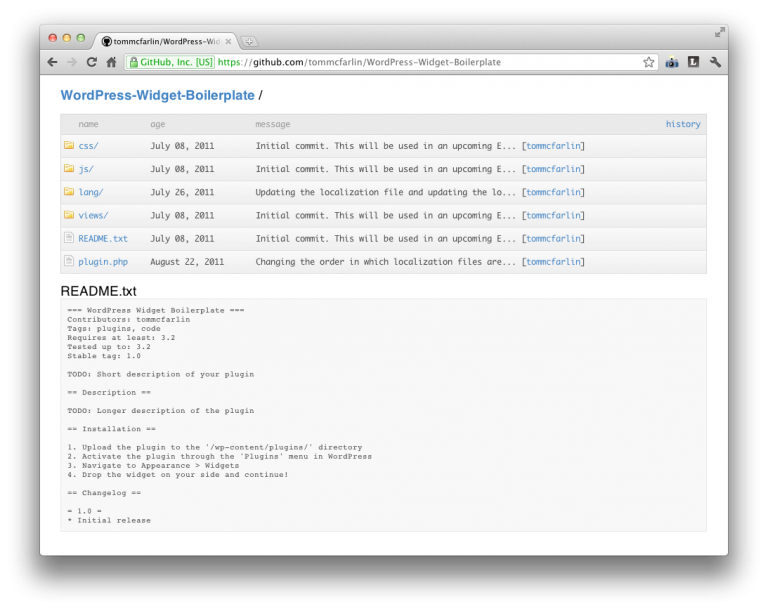
The WordPress Widget Boilerplate features the following:

  • File Organization. The Boilerplate ships with both JavaScript sources and stylesheets for both the administrator and the client-side views. It provides a basic localization file to make it easy to localize the plugin. It also includes a stubbed out README that follows WordPress conventions.
  • Documented Code. Each file of the plugin and each method of the core code is clearly documented for its purpose in the overall plugin. Additionally, the core code includes various TODO’s to make it easy for your IDE to locate everything you need to populate when working on your plugin.
  • API Implementation. The Boilerplate is based on the WordPress API in order to enforce best practices when building on top of the WordPress platform. This makes it easy to develop conventional, familiar code and makes it easy to compare your work with the recommendations of the Codex.

The WordPress Widget Boilerplate is available on GitHub and is under active development. Feel free to watch, fork, or contribute. I’m always looking to make it as solid as possible when it comes to plugin development.

38 responses to WordPress Widget Boilerplate

  1. This is, um, totally fantastic.
    Thank you!

  2. Great share. Thank you, I’ll use it. This should be included in the WordPress documentation.

  3. Hello,
    This look really interesting and I needed this kind of development for my own projects.
    Thank you for that ;)

    Cheers
    jeFFF

  4. Can’t wait for the plugin boilerplate.

  5. this is great. but is it me or is the body text on your site almost illegible?
    looks like a very very light helvetica neue here, hurts my eyes!

  6. Two words…Oh my.

    Two more if you don’t mind…Thank you.

  7. p.s. Any progress on the plug-in version?

  8. This gonna save hours and hours of time! Thanks for putting in your time in developing it Tom.

  9. Great work
    thanks

  10. Thanks for this! On another note… your comments form tripped me out for a minute because the labels are below the boxes : )

  11. Sure thing!

    And which browser are you using (or can you shoot me a screen shot)?

Trackbacks and Pingbacks:

  1. Wordpress Widget Boilerplate | Essential Wordpress - October 13, 2011

    [...] anyone looking to write their own widget for WordPress, this boilerplate seems like a particulary good starting point. This entry was posted in Uncategorized by [...]

  2. WordPress Widget Boilerplate – An organized, maintainable boilerplate for building WP widgets - CodeVisually - October 19, 2011

    [...] WordPress Widget Boilerplate ships with both JavaScript sources and stylesheets for both the administrator and the client-side [...]

  3. Useful WordPress Tools, Themes And Plugins | Ruturaj Pradeep Kohok | Your Web Advisor - March 23, 2012

    [...] WordPress Widget BoilerplateThe WordPress Widget Boilerplate features file organization, documented code, and is built with the WordPress API for best practices. [...]

  4. Useful WordPress Tools, Themes And Plugins | DigitalMofo - March 23, 2012

    [...] WordPress Widget BoilerplateThe WordPress Widget Boilerplate features file organization, documented code, and is built with the WordPress API for best practices. [...]

  5. Useful WordPress Tools, Themes And Plugins - March 23, 2012

    [...] WordPress Widget BoilerplateThe WordPress Widget Boilerplate features file organization, documented code, and is built with the WordPress API for best practices. [...]

  6. Useful WordPress Tools, Themes And Plugins | Web Design Kingston - March 24, 2012

    [...] WordPress Widget BoilerplateThe WordPress Widget Boilerplate features file organization, documented code, and is built with the WordPress API for best practices. [...]

  7. Useful WordPress Tools, Themes And PluginsWordpress Junkie - March 24, 2012

    [...] WordPress Widget BoilerplateThe WordPress Widget Boilerplate features file organization, documented code, and is built with the WordPress API for best practices. [...]

  8. Useful WordPress Tools, Themes And Plugins : Rutweb Technology - March 25, 2012

    [...] WordPress Widget BoilerplateThe WordPress Widget Boilerplate features file organization, documented code, and is built with the WordPress API for best practices. [...]

  9. Useful WordPress Tools, Themes And Plugins | VisionOn Technologies - March 26, 2012

    [...] WordPress Widget BoilerplateThe WordPress Widget Boilerplate features file organization, documented code, and is built with the WordPress API for best practices. [...]

  10. Useful WordPress Tools, Themes And Plugins - March 27, 2012

    [...] WordPress Widget Boilerplate The WordPress Widget Boilerplate features file organization, documented code, and is built with the WordPress API for best practices. [...]

  11. Useful WordPress Tools, Themes And Plugins | CS5 Design - March 27, 2012

    [...] WordPress Widget BoilerplateThe WordPress Widget Boilerplate features file organization, documented code, and is built with the WordPress API for best practices. [...]

  12. Jekyll, jQuery, Mobile Apps, Stripe, and More - Tom McFarlin - July 30, 2012

    [...] Smashing also shared my WordPress Widget Boilerplate. [...]

  13. Organizing WordPress Plugin Files - Tom McFarlin - August 30, 2012

    [...] and what I’ve found to be successful. You can find both of these methods in place with the Widget Boilerplate and the Plugin [...]

  14. Abstraction in Programming WordPress Projects - Tom McFarlin - January 24, 2013

    [...] I try to pull this practice through most everything I do especially with both the Plugin and Widget [...]

  15. Why (And How!) To Use A WordPress Boilerplate - Tom McFarlin - January 30, 2013

    [...] (thanks, by the way), you know that I work to maintain the WordPress Plugin Boilerplate and the WordPress Widget Boilerplate along with a growing community of [...]

Leave a Reply

*

Text formatting is available via select HTML.

<a href="" title=""> <abbr title=""> <acronym title=""> <b> <blockquote cite=""> <cite> <code> <del datetime=""> <em> <i> <q cite=""> <strike> <strong>