Two weeks ago, I was working with Opus 4.5 and, for the first time since working with Claude Code, I’d hit my limit for the model until it reset an hour later.
Yes, Claude Code has a /usage command to tell us exactly where we stand when using the project but if I have a set of agents or subagents working on something, I’d prefer not to interrupt their process to check usage. And if we stop them or stop what we’re doing to open yet another session just to check usage, it’s cumbersome.
I wanted something I could glance at without breaking focus and that’s exactly what BurnRate is.
What Does BurnRate Actually Do?
BurnRate is a macOS menu bar app. Click the flame icon and you get up to four progress bars depending on what the API returns that mirror the same structure as /usage:
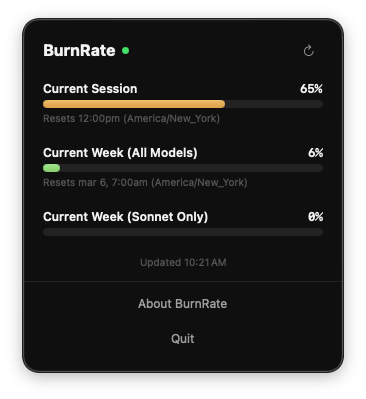
- Current Session: your usage in the rolling 5-hour window
- Current Week (All Models): total usage across all models over the last 7 days
- Current Week (Opus Only): Opus-specific weekly usage
- Current Week (Sonnet Only): Sonnet-specific weekly usage
Each bar shows the exact percentage and when the limit resets.
How It Gets Your Usage
BurnRate authenticates using the same OAuth credentials that Claude Code stores in your macOS Keychain.
It calls Anthropic’s usage API directly which is the same endpoint that powers the /usage command so the percentages and reset times are exact, not estimates.
If your session has expired, BurnRate will show an authentication prompt and you just need to run claude auth login to reconnect.
Get It
BurnRate is free. Download the DMG from the product page. Requires macOS 14 (Sonoma) or later and, obviously, Claude Code.
Note
BurnRate is distributed outside the Mac App Store (it’s signed and notarized by Apple). Because it relies on Anthropic’s usage API, it may break if Anthropic changes their authentication flow or API endpoints.
